

Azure Data Studio (formerly SQL Operations Studio) is a free Cross-Platform DB management tool for Windows, macOS and Linux. Staying true to their promise of offering a unified data management experience for developers, Microsoft recently released PostgreSQL Extension for Azure Data Studio
So now developers can use same great GUI features for PostgreSQL database as they were for SQL Server, like IntelliSense, Multiple Query windows and Custom insight dashboard. In this blog post I’ll explain how to create a custom insight and add it to PostgreSQL dashboard as a widget
For this exercise I’ll use a simple query to display ‘active connections’ grouped by connection state
Step 1. Prepare your custom insight
1. Open a new Query Editor (Ctrl+N)
2. Copy / Paste below query
-- ADS custom dashboard - Get Active Vs Inactive connections
SELECT state, count(pid)
    FROM pg_stat_activity
     GROUP BY state, datname
     HAVING datname = '<app data>' --replace with your db name
          ORDER BY count(pid) DESC;
3. Save the query as “connection_stats.SQL” file and execute the query (F5)

4. Once you get the result-set, click on View as Chart

5. Customize the chart and click on Create Insight
Step 2. Add the insight to database dashboard
- Copy the insight configuration (the JSON data).
- Press Ctrl+Comma to open User Settings
- Type dashboard in Search Settings
-

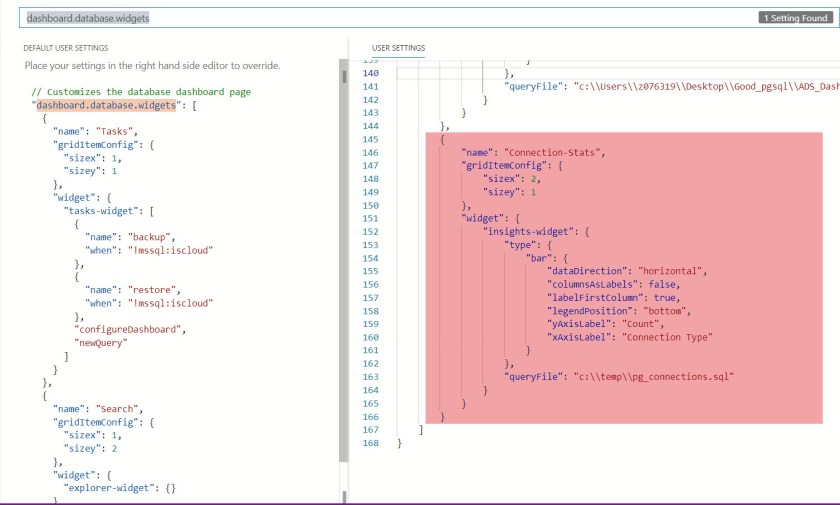
Click Edit for dashboard.database.widgets
- Paste the insight configuration JSON into dashboard.database.widgets. A formatted dashboard setting should look something like this
- Save the User Settings file
- In Server Explorer, right click on your database server name and click Manage
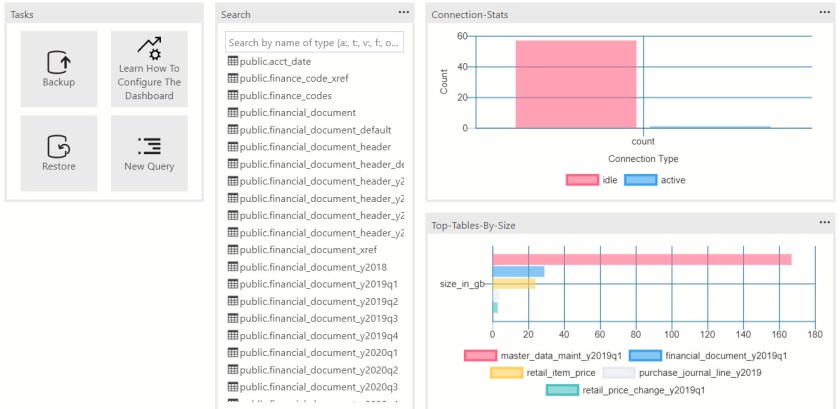 Similar to above, you can also create more such “insights” to the default server dashboard. I have created one for checking top 5 tables by size (using below query)
-- Get details of TOP `n` tables in database
SELECT cl.relname AS objectname
,pg_total_relation_size(cl.oid)/1024/1024/1024 AS size_in_GB
  FROM pg_class cl
     LEFT JOIN pg_namespace n ON (n.oid = cl.relnamespace)
     LEFT JOIN pg_stat_user_tables s ON (s.relid =cl.oid)
     WHERE nspname NOT IN ('pg_catalog', 'information_schema')
             AND cl.relkind <> 'i'
             AND nspname !~ '^pg_toast'
               ORDER BY pg_total_relation_size(cl.oid) DESC
                  LIMIT 5;


 data-nerd.blog
One thought on “Azure Data Studio PostgreSQL Extension – Custom insight dashboard”