Why Averages suck and what make Percentiles great

Average(mean), median, mode are core statistical concepts, that are often applied in software engineering. Whether you are new to programming or have multi years of computer science experience, you’ve likely at some point in time will have used these statistical functions, say to calculate system resource utilization, or network traffic or a website latency. In my current role, my team is responsible for running a telemetry platform to help dev teams measure application performance. We do this by collecting point-in-time data points referred as metrics.
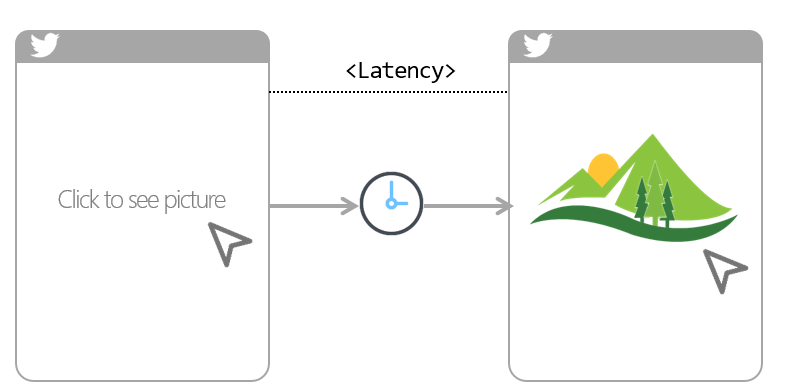
A common use case for metrics is to tell the application latency (i.e. amount of time it took between a user action and web app response to that action). For examples, amount of time it took you to click on twitter photo and till it finally showed up on your device screen. So if you have this metrics collected at regular intervals (say every 1s), you can simply average it over a period of time like an hour or a day to calculate latency. Simple right!

Continue reading “Why Averages suck and what make Percentiles great”

SQL Injection and Preventing them in your Golang app

SQL injection!… Is it really a thing?

SQL injection is a code injection technique that is capable of destroying your database. It is a code injection technique, used to attack data-driven applications, in which malicious SQL statements are inserted into an entry field for execution. (e.g. to dump the database contents to the attacker)

Continue reading “SQL Injection and Preventing them in your Golang app”

Implementing transactions in PostgreSQL using Go lang database/sql package

Introduction

A transaction is a unit of work that you want to treat as “a whole.” It has to either happen in full or not at all. In Go lang, a transaction is essentially an object that reserves a connection to the database. You begin a transaction with a call to db.Begin() and close it with a commit() or rollback() method on the resulting Tx variable.

Continue reading “Implementing transactions in PostgreSQL using Go lang database/sql package”

Querying rows from PostgreSQL from Go lang project

Introduction

In the last post Updating/Deleting rows with Go, we learned to manipulate rows in PostgreSQL database in Go project using database/sql package that ships with Go, along with github.com/lib/pq Postgres driver. In this post, we’ll learn how to query rows i.e. SELECT

Continue reading “Querying rows from PostgreSQL from Go lang project”

Updating and Deleting rows in PostgreSQL from Go lang project

Introduction

In the previous post Inserting records into a database with Go, we learned how to insert rows to PostgreSQL database from Go project using database/sql package that ships with Go, along with github.com/lib/pq Postgres driver. In this post, we’ll learn the remaining two DML (data manipulation language) operations i.e. UPDATE and DELETE.

Continue reading “Updating and Deleting rows in PostgreSQL from Go lang project”

Inserting rows in PostgreSQL db from Go lang project

Introduction

In the previous post Connecting to PostgreSQL from Go lang project, we learned how to connect to the PostgreSQL database from Go lang project using database/sql package that ships with Go, along with github.com/lib/pq Postgres driver. In this post, we’ll learn how to insert data (rows) in a PostgreSQL table.

Continue reading “Inserting rows in PostgreSQL db from Go lang project”

Connect to PostgreSQL in VS Code

To connect to PostgreSQL from Visual Studio Code (VS Code), you can use an extension called “PostgreSQL” which provides a graphical interface to interact with your PostgreSQL database.

Install Link – PostgreSQL extension

Connecting to PostgreSQL from VS Code provides several benefits, including:

    • Connect to PostgreSQL instances
    • Manage connection profiles
    • Connect to a different Postgres instance or database in each tab
    • View object DDL with ‘Go to Definition’ and ‘Peek Definition’
    • Write queries with IntelliSense
    • Run queries and save results as JSON, csv, or Excel

Install VS Code PostgreSQL extension

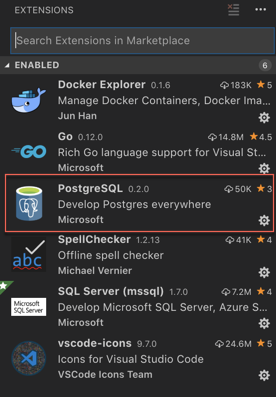
  1. Install the “PostgreSQL” extension in VS Code. You can do this by opening the Extensions view (Ctrl + Shift + X), searching for “PostgreSQL” in the search bar, and clicking on “Install” next to the “PostgreSQL” extension by Microsoft.

  2. Open the “PostgreSQL” extension by clicking on its icon in the Activity Bar (left sidebar).
    a

QuickStart

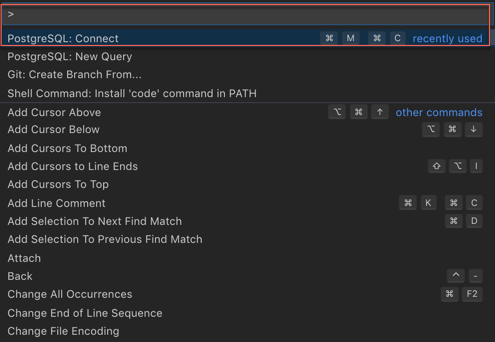
  1. Open the Command Palette Ctrl + Shift + P  (On mac use  ⌘ + Shift + P)
  2. Search and select PostgreSQL: New Query
  3. In the command palette, select Create Connection Profile. Follow the prompts to enter your Postgres instance hostname, database, username, and password.

a

You are now connected to your Postgres database. You can confirm this via the Status Bar (the ribbon at the bottom of the VS Code window). It will show your connected hostname, database, and user.

Query the database

  1. Type a query ex. SELECT * FROM pg_stat_activity;
  2. Right-click, select Execute Query / keyboard shortcut [⌘M ⌘R] and the results will show in a new window.
  3. You can also save the query results as JSONCSV or Excel.

So now, you can seamlessly code for PostgreSQL from Microsoft VS Code without switching screens, leverage powerful intellisense and execute queries.

Enjoy Coding!

IMP NOTE: Result windows from queries won´t show up again after being closed. This is bug with current version and is being worked by dev team. Workaround is either to keep the result window Open Or close / re-open the VS code window.


Azure Data Studio – Switching from Management Studio (SSMS) to Azure Data Studio (ADS)

Azure Data Studio (formerly SQL Operations Studio) is a free Cross-Platform DB management tool for for Windows, macOS and Linux. Azure Data Studio (ADS) initial release was only compatible for SQL Server, however recently Microsoft released a PostgreSQL extension for ADS – so now you can also manage your PostgreSQL instance using ADS. For more details on Azure Data Studio PostgreSQL Extension, refer to my earlier posts

Continue reading “Azure Data Studio – Switching from Management Studio (SSMS) to Azure Data Studio (ADS)”

Azure Data Studio PostgreSQL Extension – Custom insight dashboard

Azure Data Studio (formerly SQL Operations Studio) is a free Cross-Platform DB management tool for Windows, macOS and Linux.  Staying true to their promise of offering a unified data management experience for developers, Microsoft recently released PostgreSQL Extension for Azure Data Studio

Continue reading “Azure Data Studio PostgreSQL Extension – Custom insight dashboard”

PostgreSQL Table Partitioning Part II – Declarative Partitioning

Starting Postgres 10.x and onward, it is now possible to create declarative partitions.

In my previous post ‘postgresql-table-partitioning-part-i-implementation-using-inheritance‘, I discussed about implementing Partitioning in PostgreSQL using ‘Inheritance’. Up until PostgreSQL 9, it was only way to partition tables in PostgreSQL. It was simple to implement, however had some limitations like:

Continue reading “PostgreSQL Table Partitioning Part II – Declarative Partitioning”